Showing posts with label Mediawiki. Show all posts

Wednesday, March 03, 2010

Setting up a local Wikisource

A little while ago I came across Wikisource, and it dawned on me that this is a model for BHL. To quote from the Wikisource web site:
Wikisource is an online library of free content publications, collected and maintained by our community. We now have 140,596 texts in the English language library. See our inclusion policy and help pages for information on getting started, and the community portal for ways you can contribute. Feel free to ask questions on the community discussion page, and to experiment in the sandbox.

Much of their content comes from the Internet Archive (as does BHL's), and Wikisource have developed extensions for Mediaiwki to do some cool things, such as extract text and images from DjVu files. If you haven't come across DjVu before, it's a format designed to store scanned documents, and comes with some powerful open source tools for extracting images and OCR text. Wikisource can take a DjVu file, extract images, thumbnails and text, creating side-by-side displays where users can edit and correct OCR text:

wikisource.png


So, like a fool, I decided to try and install some of these tools locally and see if I could do the same for some BHL content. That's when the "fun" started. Normally Mediawiki is pretty easy to set up. There are a few wrinkles because my servers live behind an institutional HTTP proxy, so I often need to tweak some code (such as the OpenID extension, which also needs a fix for PHP 5.3), but installing the extensions that underlie Wikisource wasn't quite so straightforward.

DjVu
djvu.png
The first step is supporting DjVu files in Mediawiki. This seems straightforward (see How to use DjVu with MediaWiki). First off you need the DjVu tools. I use Mac OS X, so I get these automatically if I install DjView. The tools reside in Applications/DjView.app/Contents/bin (you can see this folder if you Control+click on the DjView icon and choose "Show Package Contents"), so adding this path to the name of each tool DjVu tool Mediaiwiki needs takes care of that.

But I also need NetPbm, and now the pain starts. NetPbm won't build on Mac OS X, at least not out of the box on Snow Leopard. It makes assumptions about Unix that Mac OS X doesn't satisfy. After some compiler error messages concerning missing variables that I eventually traced to signal.h I gave up and installed MacPorts, which has a working version of NetPbm. MacPorts installed fine, but it's a pain having multiple copies of the same tools, one in /usr/local, and one in /opt/local.

OK, now we can display DjVu files in Mediawiki. It's small victories like this which leads to over confidence...

Proofread Page
Next comes the Proofread Page extension, which provides the editing functionality. This seemed fairly straightforward, although the documentation referred to a SQL file (ProofreadPage.sql) that doesn't seem to exist. More worringly, the documentation also says:
If you want to install it on your own wiki, you will need to install a 404 handler for generating thumbnails, such as WebStore.

This seems fine, except the page for WebStore states:
The WebStore extension is needed by the ProofreadPage extension. Unfortunately, documentation seems to be missing completely. Please add anything you know about this extension here.

Then there are the numerous statements "doesn't work" scattered through the page. So, I installed the extension and hoped for the best. It didn't work. As in, really, really didn't work. It took an hour or so of potentially fatal levels of blood pressure-inducing frustration to get to the bottom of this.

WebStore
Now, Webstore is a clever idea. Basically, the Proofread Page extension will need thumbnails of images in potentially varying sizes, and creates a link to the image it wants. Since that image doesn't exist on the web site the web server returns 404 Not Found, which normally results in a page like this. Instead, we tell the web server (Apache) that WebStore will handle 404's. If the request is for an image, Webstore creates the image file, streams it to the web browser, then deletes the file from disk. Essentially WebStore creates a web server for images (Webdot uses much the same trick, but without the 404 handler). Debugging a web server called by another web server is tricky (at least for a clumsy programmer like me), but by hacking the Webstore code (and switching on Mediawiki debug logging) I managed to figure out that Webstore seemed to be fetching and streaming the images fine, but they simply didn't appear in the wiki page (I got the little broken image icon instead). I tried alternative ways of dumping the image file to output, adding HTTP headers, all manner of things. Eventually (by accident, no idea how it happened) I managed to get an image URL to display in the Chrome web browser, but it wasn't an image(!) -- instead I got a PHP warning about two methods in the class DjVuHandler (mustRender and isMultiPage) not being consistent with the class they inherit from. WTF?! Eventually I found the relevant file (DjVu.php in includes/media in the Mediawiki folder), added the parameter $file to both methods, and suddenly everything works. At this point I didn't know whether to laugh or cry.

OCR text
There are some issues with OCR text from Internet Archive DjVu files. There are some extraneous characters (new lines, etc.) that I need to filter, and I'll probably have to deal with hyphenation. It looks fairly straightforward to edit the proofing extension code to handle these situations.

Semantic Mediawiki
Having got the proofing extension working, I then wanted to install the Semantic Mediawiki extensions so that I could support basic inference on the wiki. I approached this with some trepidation as there are issues with Mediawiki namespaces, but everything played nice and so far things seem to be working. Now I can explore whether I can combine the proofing tools from Wikisource with the code I've developed for iTaxon.

BioStor
So, having got something working, the plan is to integrate this with BioStor. One model I like is the video site Metacafe. For each video Metacafe has a custom web page(e.g., http://www.metacafe.com/watch/4137093) with an Edit Video Details link that takes you to a Semantic Mediawiki page where you can edit metadata for the video. I envisage doing something similar for BioStor, where my existing code provides a simple view of an article (perhaps with some nice visualisations), with a link to the corresponding wiki page where you can edit the metadata, and correct the OCR text.

Lessons
In the end I got there, although it was a struggle. Mediawiki is a huge, complicated bit of software, and is also part of a larger ecosystem of extensions, so it has enormous power. But there are lots of times when I think it would be easier if I wrote something to replicate the bit of functionality that I want. For example, side-by-side display of text and images would be straightforward to do. But once you start to think about supporting mark-up, user authentication, recording edit history, etc., the idea of using tools others have developed becomes more attractive. And the code is open source, which means if it doesn't work there's a fighting chance I can figure out why, and maybe fix it. It often feels harder than it should be, but I'll find out in the next few days whether yesterday's exertions were worth it.

Thursday, September 17, 2009

Towards a wiki of phylogenies

At the start of this week I took part in a biodiversity informatics workshop at the Naturhistoriska riksmuseets, organised by Kevin Holston. It was a fun experience, and Kevin was a great host, going out of his way to make sure myself and other contributors were looked after. I gave my usual pitch along the lines of "if you're not online you don't exist", and talked about iSpecies, identifiers, and wikis.

I also ran a short, not terribly successful exercise using iTaxon to demo what semantic wikis can do. As is often the case with something that hasn't been polished yet, the students found the mechanics of doing things less than intuitive. I need to do a lot of work making data input easier (to date I've focussed on automated adding of data, and forms to edit existing data). Adding data is easy if you know how, but the user needs to know more than they really should have to.

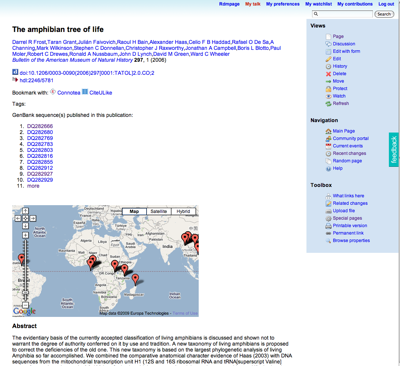
The exercise was to take some frog taxa from the Frost et al. amphibian tree (doi:10.1206/0003-0090(2006)297[0001:TATOL]2.0.CO;2) and link them to GenBank sequences and museum specimens. The hope was that by making these links new information would emerge. You could think of it as an editable version of this. With a bit of post-exercise tidying, we got someway there. The wiki page for the Frost et al.
paper
now shows a list of sequences from that paper (not all, I hasten to add), and a map for those sequences that the students added to the wiki:

frost.png


Although much remains to be done, I can't help thinking that this approach would work well for a database like TreeBASE, where one really needs to add a lot of annotation to make it useful (for example, mapping OTUs to taxon names, linking data to sequences and specimens). So, one of the things I'm going to look at is dumping a copy of TreeBASE (complete with trees) into the wiki and seeing what can be done with it. Oh, and I need to make it much, much easier for people to add data.

Thursday, January 15, 2009

Wikis versus Scratchpads

Yes, I know this is ultimately a case of the "genius of and", but the more I play with the Semantic Mediawiki extension the more I think this is going to be the most productive way forward. I've had numerous conversations with Vince Smith about this. Vince and colleagues at the NHM have been doing a lot of work on "Scratchpads" -- Drupal based webs sites that tend to be taxon-focussed. My worry is that in the long term this is going to create lots of silos that some poor fool will have to aggregate together to do anything synthetic with. This makes inference difficult, and also raises issues of duplication (for example, in bibliographies).

I've avoided wikis for a while because of the reliance on plain text (i.e., little structure) (see this old post of mine on Semant), but Semantic Mediawiki provides a fairly simple way to structure information, and it also provides some basic inference. This makes it possible to create wiki pages that are largely populated by database queries, rather than requiring manual editing. For example, I have queries now that will automatically populate a page about a person with that person's publications, and any taxa named after that person. The actual wiki page itself has hardly any text (basically the name of the person). That is, nobody has to manually edit the wiki page to update lists of published papers. Similarly, maps can be generated in situ using queries that aggregate localities mentioned on a wiki page with localities for GenBank sequences and specimens. Very quickly relationships start to emerge without any manual intervention. The combination of templates and Semantic Mediawiki queries seems a pretty powerful way to aggregate information. There are, of course, limitations. The queries are fairly basic, and there's not the power of something like SPARQL, but it's a start. Coupled with the ease of editing to fix the errors in the contributing databases, and the ease of redirecting to handle multiple identifiers, I think a wiki-based approach has a lot of promise.

So, I've been teasing Vince that Drupal (or another CMS) is probably the wrong approach, and that semantic wikis are much more powerful (something Gregor Hagedorn has also been arguing). Vince would probably counter that the goal of scratchpads is to move taxonomists into the digital age by providing them with a customisable platform for them to store and display their data, hence his mission is to capture data. My focus is more to do with aggregating and synthesising the large amount of data we already have (and are struggling to do anything exciting with). Hence, the "genius of and". However, I still worry that when we have a world with loads of scratch pads with overlapping data, some poor fool will still have to merge them together to make sense of it all.

Monday, November 10, 2008

Rewriting DOIs

One problem with my cunning plan to use Mediawiki REDIRECTs to handle DOIs is that some DOIs, such as those that BioOne serves based on SICIs contain square brackets, [ ], which conflicts with wiki syntax. For example, doi:10.1206/0003-0090(2006)297[0001:TATOL]2.0.CO;2 I want to enable users to enter a raw DOI, so I've been playing with a simple URL rewrite in Appache httd.conf, namely:

RewriteRule ^/wiki/doi:(.*)\[(.*)\](.*)$ /w/index.php?title=Doi:$1-$2-$3 [NC,R]

This rewrites the [ and ] in the original DOI, then forces a new HTTP request (hence the [NC,R] at the end of the line). This keeps Mediawiki happy, at the cost of the REDIRECT page having a DOI that looks a slightly different from the original. However, it means the user can enter the original DOI in the URL, and not have to manually edit it.

Monday, October 27, 2008

Modelling GUIDs and taxon names in Mediawiki

Thinking more and more about using Mediawiki (or, more precisely, Semantic Mediawiki) as a platform for storing and querying information, rather than write my own tools completely from scratch. This means I need ways of modelling some relationships between identifiers and objects.

The first is the relationship between document identifiers such as DOIs and metadata about the document itself. One approach which seems natural is to create a wiki page for the identifier, and have that page consist of a #REDIRECT statement which redirects the user to the wiki page on the actual article.


This seems a reasonable solution because:
  • The user can find the article using the GUID (in effect we replicate the redirection DOIs make use of)
  • The GUID itself can be annotated
  • It is trivial to have multiple GUIDs linking to the same paper (e.g., PubMed identifiers, Handles, etc.).

Taxon names present another set of problems, mainly because of homonyms (the same name being give to two or more diferent taxa).The obvious approach is to do what Wikipedea does (e.g., Morus), namely have a disambiguation page that enable the user to choose which taxon they want. For example:


In this example, there are two taxon names Pinnotheres, so the user would be able to choose between them.

For names which had only one corresponding taxon name we would still have two pages (one for the name string, and one for the taxon name), which would be linked by a REDIRECT:


The advantage of this is that if we subsequently discover a homonym we can easily handle it by changing the REDIRECT page to a disambiguation page. In the meantime, users can simply use the name string because they will be automatically redirected to the taxon name page (which will have the actual information about the name, for example, where it was published).

Of course, we could do all of this in custom software, but the more I look at it the power to edit the relationships between objects, as well as the metadata, and also make inferences makes Semantic Mediawiki look very attractive.

Friday, October 24, 2008

Google Books and Mediawiki

Following on from the previous post, I wrote a simpe Mediawiki extension to insert a Google Book into a wiki page. Written in a few minutes, not tested much, etc.

To use this, copy the code below and save in a file googlebook.php in the extensions directory of your Mediawiki installation.


<?php
# rdmp

# Google Book extension
# Embed a Google Book into Mediawiki
#
# Usage:
# <googlebook id="OCLC:4208784" />
#
# To install it put this file in the extensions directory
# To activate the extension, include it from your LocalSettings.php
# with: require("extensions/googlebook.php");

$wgExtensionFunctions[] = "wfGoogleBook";

function wfGoogleBook() {
global $wgParser;
# registers the <googlebook> extension with the WikiText parser
$wgParser->setHook( "googlebook", "renderGoogleBook" );
}

# The callback function for converting the input text to HTML output
function renderGoogleBook( $input, $argv )
{
$width = 425;
$height = 400;

if (isset($argv["width"]))
{
$width = $argv["width"];
}
if (isset($argv["height"]))
{
$width = $argv["height"];
}

$output = '<script type="text/javascript"
src="http://books.google.com/books/previewlib.js">
</script>';
$output .= '<script type="text/javascript">
GBS_insertEmbeddedViewer(\''
. $argv["id"] . '\','. $width . ',' . $height . ');
</script>';

return $output;
}
?>


In your LocalSettings.php file add the line


require("extensions/googlebook.php");


Now you can add a Google book to a wiki page by adding a <googlebook> tag. For example:


<googlebook id="OCLC:4208784" />


The id gives the book identifier (such as an OCLC number or a ISBN (you need to include the identifier prefix). By defaulot, the book will appear in a box 425 × 400 pixels in size. You can add optional width and height parameters to adjust this.