Showing posts with label markup. Show all posts

Monday, February 10, 2014

Mark-up of biodiversity literature

UnknownI gave a remote presentation at a proiBioSphere workshop this morning. The slides are below (to try and make it a bit more engaging than a desk of Powerpoints I played around with Prezi).


There is a version on Vimeo that has audio as well.


I sketched out the biodiversity "knowledge graph", then talked about how mark-up relates to this, finishing with a few questions. The question that seems to have gotten people a little agitated is the relative importance of markup versus, say, indexing. As Terry Catapano pointed out, in a sense this is really a continuum. If we index content (e.g., locate a string that is a taxonomic name) and flag that content in the text, then we are adding mark-up (if we don't, we are simply indexing, but even then we have mark-up at some level, e.g. "this term occurs some where on this page"). So my question is really what level of markup do we need to do useful work? Much of the discussion so far has centered around very detailed mark-up (e.g., the kind of thing ZooKeys does to each article). My concern has always been how scalable this is, given the size of the taxonomic literature (in which ZooKeys is barely a blip). It's the usual trade off, do we go for breadth (all content indexed, but little or no mark-up), or do we go for depth (extensive mark-up for a subset of articles)? Where you stand on that trade off will determine to what extent you want detailed mark up, versus whether indexing is "good enough".

Wednesday, July 13, 2011

Correcting OCR using hOCR in Firefox

Quick post on a little tool I came across, moz-hocr-edit. This Firefox add-on lets you proofread Optical Character Recognition (OCR) output. Given my interest in OCR and the Biodiversity Heritage Library I decided to take it for a spin.

moz-hocr-edit uses the hOCR, which is a format for representing the output of OCR software, and is used by tools such as OCRopus (you can see the public specification for hOCR here). Basically it's a microformat, that is, it's HTML with some additional tags. Given some hOCR, moz-hocr-edit enables you to edit the OCR output line-by-line.

Demo
I've created a simple demo based upon Case 3368 Eatoniella Dall, 1876 and EATONIELLIDAE Ponder, 1965 (Mollusca, Gastropoda): proposed conservation. For the demo to work you will need to use the Firefox web browser with the moz-hocr-edit installed.

  1. Go to http://dl.dropbox.com/u/639486/hocr/80780.html
  2. You will see a simple HTML representation of the OCR text from "Case 3368 Eatoniella Dall, 1876 and EATONIELLIDAE Ponder, 1965 (Mollusca, Gastropoda): proposed conservation". I created this HTML from the original ABBYY FineReader XML from the Internet Archive.
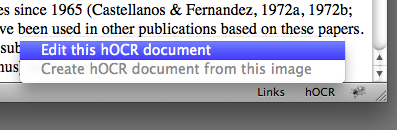
  3. On the bottom right-hand of the Firefox browser window you should see hOCR. Click on it and select "Edit this hOCR document":
    Statusbar
  4. Firefox will open a new tab that will look something like this:
    Screenshot
  5. You can now edit individual lines of text, and see your edits applied to the HTML below.
moz-hocr-edit is a neat little tool. With appropriate web server settings (and, as the tool's author Jim Garrison suggests, autoversioning) it could the basis of a great tool for correcting OCR errors in BHL.