Friday, September 24, 2010

Mendeley Connect

When I first launched BioStor (an article finding tool built on the top of the (Biodiversity heritage Library) I wanted people to be able to edit metadata and add references, but also minimise the chances that junk would get added. As a quick and dirty deterrent I used reCAPTCHA, so anybody adding a reference or editing the metadata had to pass a CAPTHCA before their edits were accepted.

While reCAPTCHA does the trick, it can be tedious for somebody editing a lot of articles to have to pass a CAPTHCA every time they edit an article. Ed Baker of the International Commission on Zoological Nomenclature (ICZN) has a project to identify all the articles in the Bulletin of Zoological Nomenclature, and has been gently bugging me to add a login feature to BioStor. I played for a while with OpenID, but it occurred to me that Mendeley might be a more sensible strategy. Mendeley's API supports OAuth, a protocol where you can grant an application access to another application, but without giving away any passwords. It's used by Twitter and Facebook, among others. Indeed, a growing number of sites on the web are using Twitter and/or Facebook services to enable users to log in, rather than write their own code to support login, usernames, passwords, etc.

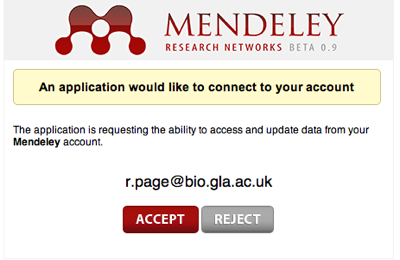
In the case of BioStor, I've added a link to sign in via Mendeley. if you click on it you get taken to a page like this:

connect.png
If you're happy for BioStor to connect to Mendeley, you click on Accept and BioStor won't bug you to fill in a CAPTCHA. Once Mendeley's API matures it would be nice to add features such as the ability to add a reference in BioStor straight to your Mendeley library (this is doable now, but the Mendeley API looses some key metadata such as page numbers).

facebook-connect.jpg
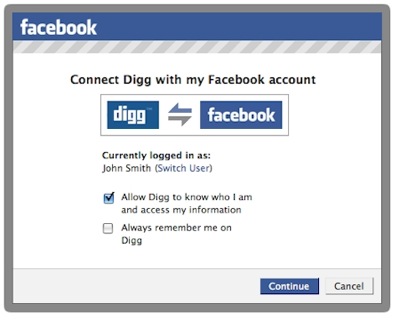
But, thinking more broadly, Mendeley has an opportunity here to provide services similar to Facebook Connect. For example, instead of simply having buttons on web pages to bookmark papers, we could have buttons indicating how many people had added a paper to their library, and whether any of those people were in your contacts. We could extend this further an create something like Facebook's Open Graph Protocol, which supports the "Like" button. Or perhaps, we could have an app that integrates with Facebook and harvests your "Likes" that are papers.

Food for thought. Meantime, I hope users like Ed will find BioStor less tedious to use now that they can log in via Mendeley.

Wednesday, September 22, 2010

GeoCouch

@mikeal a little tedious. you can take OSM and then convert it to SHP and then http://github.com/maxogden/shp2geocouchless than a minute ago via web


The tweet above inspired me to take a quick look at GeoCouch, a version of CouchDB that supports spatial queries. This is something I need if I'm going to start playing seriously with CouchDB. So, it was off to Installing and working with GeoCouch, grabbing a copy of HomeBrew (yet another package manager for Mac OS X), in the hope of installing GeoCouch. Things went fairly smoothly, although it took what seemed like an age to build everything. But I now have GeoCouch running. Previously I'd been running CouchDB using http://janl.github.com/couchdbx/, which launches vanilla CouchDB. However, if you launch CouchDBX after starting GeoCouch from the command line, CouchDBX is talking to GeoCouch.

I then grabbed shp2geocouch to try some shape files (I grabbed some shape files from the IUCN to play with). If you're on a Mac grab GISLook to get Quick Look previews of these files. Since I'm new to ruby there were a couple of gotchas, such as lacking some prerequisites (httparty and couchrest, both installed by typing gem install <name of package>), and there was the small matter of needing to add ~/.gem/ruby/1.8/bin to my path so I could find shp2geocouch (spot the ruby neophyte). The shape file didn't get processed completely, but at least I managed to get some data into GeoCouch.

gis.png
So far I've been playing with the examples at http://github.com/vmx/couchdb, and things seem to work. At least, the basic bounding box queries work. I'm tempted to play with this some more (and get my head arounbd GeoJSON), perhaps trying to recreate the functionality of my Elsevier Challenge entry, for which I wrote a custom key-value database that was awfully clunky.

Finding scientific articles in a large digital archive: BioStor and the Biodiversity Heritage Library

npre20104928-1.thumb.pngYesterday I uploaded a manuscript to Nature Precedings that describes the inner workings of BioStor. The title is "Finding scientific articles in a large digital archive: BioStor and the Biodiversity Heritage Library", and you can grab it here: hdl:10101/npre.2010.4928.1.

Manuscripts describing databases are usually pretty turgid affairs, and this isn't an exception, despite my attempts to spice it up with the tale of Leviathan, oops, Livyatan (see doi:10.1038/nature09381 and Wikipedia). Plus, I can't escape the thought that BioStor would have been a lot more fun to write if I'd used a key-value database like CouchDB. I fear this is often the way of things. By the time it comes to writing something up, you realise that if you could start over you'd do it rather differently.

Monday, September 13, 2010

BHL and the iPad

@elyw I'd leave bookmarking to 3rd party, e.g. Mendeley. #bhlib specific issues incl. displaying DjVu files, and highlighting taxon namesless than a minute ago via Tweetie for Mac


Quick mock-up of a possible BHL iPad app (made using OmniGraffle), showing a paper from BioStor(http://biostor.org/reference/50335). Idea is to display a scanned page at a time, with taxonomic names on page being clickable (for example, user might get a list of other BHL content for this name). To enable quick navigation all the pages in the document being viewed are displayed in a scrollable gallery below main page.

bhlipad.jpg

Key to making this happen is being able to display DjVu files in a sensible way, maybe building on DjVu XML to HTML. Because BHL content is scanned, it makes sense to treat content as pages. We could extract OCR text and display that as a continuous block of text, but the OCR is sometimes pretty poor, and we'd also have to parse the text and interpret its structure (e.g., this is the title, these are section headings, etc.), and that's going to be hard work.

Friday, September 10, 2010

Touching citations on the iPad

Quick demo of the mockup I alluded to in the previous post. Here's a screen shot of the article "PhyloExplorer: a web server to validate, explore and query phylogenetic trees" (doi:10.1186/1471-2148-9-108) as displayed as a web-app on the iPad. You can view this at http://iphylo.org/~rpage/ipad/touch/ (you don't need an iPad, although it does work rather better on one).

touch.png
I've taken the XML for the article, and redisplayed it as HTML, with (most) of the citations highlighted in blue. If you touch one (or click on it if you're using a desktop browser) then you'll see a popover with some basic bibliographic details. For some papers which are Open Access I've extracted thumbnails of the figures, such as for "PhyloFinder: an intelligent search engine for phylogenetic tree databases" (doi:10.1186/1471-2148-8-90), shown above (and in more detail below):

popover.png
The idea is to give the reader a sense of what the paper is about, beyond can be gleaned from just the title and authors. The idea was inspired by the Biotext search engine from Marti Hearst's group, as well as Elsevier's "graphical abstract" noted by Alex Wild (@Myrmecos).

Here's a quick screencast showing it "live":


The next step is to enable the reader to then go and read this paper within the iPad web-app (doh!), which is fairly trivial to do, but it's Friday and I'm already late...

CouchDB, Mendeley, and what I really want in an iPad article viewer

Playing with @couchdb, starting to think of the Mendeley API as a read/write JSON store, and having a reader app built on that...less than a minute ago via Tweetie for Mac


It's slowly dawning on me that many of the ingredients for an alternative different way to browse scientific articles may already be in place. After my first crude efforts at what an iPad reader might look like I've started afresh with a new attempt, based on the Sencha Touch framework. The goal here isn't to make a polished app, but rather to get a sense of what could be done.

The first goal is to be able to browse the literature as if it was a connected series of documents (which is what, of course, it is). This requires taking the full text of an article, extracting the citations, and making them links to further documents (also with their citations extracted, and so on). Leaving aside the obvious problem that this approach is limited to open access articles, an app that does this is going to have to store a lot of bibliographic data as the reader browses the literature (otherwise we going to have to do all the processing on the fly, and that's not going to be fast enough). So, we need some storage.

MySQL
One option is to write a MySQL database to hold articles, books, etc. Doable (I've done more of these than I care to remember), but things get messy pretty quickly, especially as you add functionality (tags, fulltext, figures, etc.).

RDF
Another option is to use RDF and a tripe store. I've played with linked data quite a bit lately (see previous "Friday follies" here and here), and I thought that a triple store would be a great way support an article browser (especially as we add additional kinds of data, such as sequences, specimens, phylogenies, etc.). But linked data is a mess. For the things I care about there are either no canonical identifiers, or too many, and rarely does the primary data provider served linked data compliant URLs (e.g., NCBI), hence we end up with a plethora of wrappers around these sources. Then there's the issue of what vocabularies to use (once again, there are either none, or too many). As a query language SPARQL isn't great, and don't even get me started on the issue of editing data. OK, so I get the whole idea of linked data, it's just that the overhead of getting anything done seems too high. You've got to get a lot of ducks to line up.

CounchDBlogo.png
So, I started playing with CounchDB, in a fairly idle way. I'd had a look before, but didn't really get my head around the very different way of querying a database that CouchDB requires. Despite this learning curve, CouchDB has some great features. It stores documents in JSON, which makes it trivial to add data as objects (instead of mucking around with breaking them up into tables for SQL, or atomising them into triples for RDF), it supports versioning right out of the box (vital because metadata is often wrong and needs to be tidied up), and you talk to it using HTTP, which means no middleware to get in the way. You just point your browser (or curl, or whatever HTTP tool you have) and send GET, POST, PUT, or DELETE commands. And now it's in the cloud.

In some ways ending up with CouchDB (or something similar) seems inevitable. The one "semantic web" tool that I've made most use of is Semantic MediaWiki, which powers the NCBI to Wikipedia mapping I created in June. Semantic Mediawiki has it's uses, but occasionally it has driven me to distraction. But, when you get down to it, Semantic Mediawiki is really just a versioned document store (where the documents are typically key-value pairs), over which have been laid a pretty limited query language and some RDF export features. Put like this, most of the huge Mediawiki engine underlying Semantic MediaWiki isn't needed, so why not cut to the chase and use a purpose-built versioned document store? Enter CouchDB.

Browsing and Mendeley
So, what I have in mind is a browser that crawls a document, extracting citations, and enabling the reader to explore those. Eventually it will also extract all the other chocolatey goodness in an article (sequences, specimens, taxonomic names, etc.), but for now I'm focussing on articles and citations. A browser would need to store article metadata (say, each time it encounters an article for the first time), as well as update existing metadata (by adding missing DOIs, PubMed ids, citations, etc.), so what easier way than as JSON in a document store such as CouchDB? This is what I'm exploring at the moment, but let's take a step back for a second.

The Mendeley API, as poorly developed as it is, could be treated as essentially a wrapper around a JSON document store (the API stores and returns JSON), and speaks HTTP. So, we could imagine a browser that crawls the Mendeley database, adding papers that aren't in Mendeley as it goes. The act of browsing and reading would actively contribute to the database. Of course, we could spin this around, and argue that a crawler + CouchDB could pretty effectively create a clone of Mendeley's database (albeit without the social networking features that come with have a large user community).

This is another reason why the current crop of iPad article viewers, Mendeley's included, are so disappointing. There's the potential to completely change the way we interact with the scientific literature (instead of passively consuming PDFs), and Mendeley is ideally positioned to support this. Yes, I realise that for the vast majority of people being able to manage their PDFs and format bibliographies in MS Word are the killer features, but, seriously, is that all we aspire too?
Friday, September 03, 2010

Viewing scientific articles on the iPad: browsing articles

touchevents.pngIn previous articles I've looked at how various apps display scientific articles. The apps I looked at were:


So, where next? As Ian Mulvany noted in a comment on an earlier post, I haven't attempted to summarise the best user interface metaphors for navigation. Rather than try and do that in the abstract, I'd like to create some prototypes to play with various ideas. The Sencha Touch framework looks a good place to start. It's web-based, so things can be prototyped rapidly (I'm not going to learn Objective C anytime soon). There's a moderately steep learning curve, unless you've written a lot of Javascript (I've done some, but not a lot), but it seems to offer a lot of functionality. Another advantage of developing a web app is that it keeps the focus on making the content accessible across devices, and using the web as the means to display and interact with content.

Then there is also the issue (in addition to displaying an individual article) of how to browse and find articles to view. Here are some possibilities.

Publisher's stream
Apps such as the Nature app and the PLos Reader provide you with a stream of articles from a single publisher. This is obviously a bit limiting for the reader, but might have some advantages if the publisher has specifically enhanced their content for devices such as the iPad.

Personal library
Apps such as Mendeley and Papers provide articles from your personal library. These are papers you care about, and one you may make active use of.

Social
Social readers such as Flipboard show the power of bringing together in one place content derived from social streams, such as Twitter and Facebook, as well as curated sources and publisher streams. Mendeley and other social bookmarking services (e.g., CiteULike, Connotea) could be used to provide social similar streams of papers for an article viewer. Here the goal is probably to find out what papers people you know find interesting.

Spatialipadmap.png
In an earlier post I used a map to explore papers in my BioStor archive. This would be an obvious thing to add to an iPad app, especially as the iPad knows where you are. Hence, you could imagine browsing papers about areas that are near you, or perhaps by authors near you. This would be useful if, say, you wanted to know about ecological or health studies of the area you live in. If the geographic search was for people rather than papers, you could easily discovering what kind of research is published by universities or other research bodies that are near your current location.

Of course, Earth is not the only thing we can explore spatially. Google maps can display other bodies in the solar system, (e.g., Mars), as well as the night sky. Imagine being interested in astronomy and being able to browse papers about specific planetary or stellar objects. Likewise, genomes can be browsed using Google maps-inspired browsers (e.g., jBrowse), so we could have an app where you could easily retrieve articles about a particular gene or other region of a genome.

Categories
Another way to browse content is by topic. Classifying knowledge into categories is somewhat fraught, but there are some obvious wasy this could be useful. A biologist might want to navigate content by taxonomic group, particularly if they want to browse through the 1000's of articles published in a journal such as Zootaxa (hence my experiments on browsing EOL). Of course, a tree is not the only way to navigate hierarchical content. Treemaps are another example, and I've played with various versions in the past (see here and here).

qt.png

I have a love-hate relationship with treemaps, but some of the most interesting work I've seen on treemaps has been motivated by displaying information on small screens, e.g. "Using treemaps to visualize threaded discussion forums on PDAs" (doi:10.1145/1056808.1056915).

Summary
These notes list some of the more obvious ways to browse a collection of articles. It would be fun to explore these (and other approaches) in parallel with thinking about how to display the actual articles. These two issues are related, in the sense that the more metadata we can extract from the articles (such as keywords, taxonomic names and other named entities, geographic localities, etc.) the richer the possibilities for finding our way through those articles.

Tuesday, August 31, 2010

ReaderMeter: what's in a name?

Screen_shot_2010-08-30_at_22.37.31.pngDario Taraborelli has released ReaderMeter, an elegant app built on top of the Mendeley API. You enter an author's name and it summarises that authorship's readership in Mendeley. The app provides some summary statistics (mine are shown below), and if you click on the horizontal bar corresponding to a paper, you can see a visualisation of who is reading your paper, including a nice map.

meter.png

As ever with author names, there are issues of people's name having more than one spelling. In Mendeley I'm known as Roderic D. M. Page, R. D. M. Page, Rod Page, Roderic Page, Roderic D. M. Page, and doubtless some others. Searching ReaderMeter using different spellings of my name gives different results. There are various approaches to tackling this problem, I've touched on one approach earlier.

However, there's a different way to tackle this problem in the context of apps like ReaderMeter, because if you're a Mendeley user you can assert that you are the author of a paper (these papers live in your "My Publications" collection). Using Mendeley's API, an app could retrieve this list of publications (providing the user gave it access), and we could compute readership statistics from the set of articles "known" to be authored (leaving aside the issue of people gaming the system by spuriously claiming authorship). In this way the app relies on the default behaviour of Mendeley users - uploading and self-identifying the articles they've written.

Implementing a feature like this posses two problems. The first is access to a user's data. Mendeley's API supports OAuth, so it could be done in such a way that only the account's user could authorise the app to access this list. The app could store the fact that the user has verified that the list of publications. Think of it as a bit like Amazon's Real Name™ feature.

The other obstacle is Mendeley's API, which returns readership statistics for public documents (i.e., those in the central aggregation). At present, using the API there is no way to link the global id for a Mendeley reference (e.g., ae7dd6a0-6d09-11df-936c-0026b95e484c) with the local id (e.g., 3582682802) that reference has in a user's collection, unless we resort to trying to match articles by searching by identifiers or article titles. If the API exposed these links, apps like ReaderMeter could become even more powerful (and personalised).

Viewing scientific articles on the iPad: iBooks

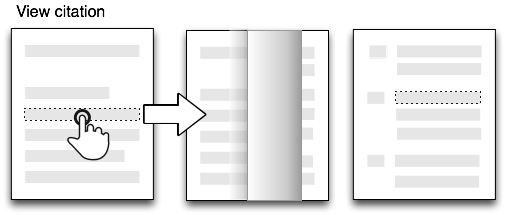
Apple's iBooks app is an ePub and PDF reader, and one could write a lengthy article about its interface. However, in the context of these posts on visualising the scientific article there's one feature that has particularly struck me. When reading a book that cited other literature the citations are hyper-links: click on one and iBooks forwards you (via the page turning effect) to the reference in the book's bibliography. This can be a little jarring (one minute you're reading the page, next you're in the bibliography), but to help maintain context the reference is preceded by the snippet of text in which it is cited:

touch7.jpg

To make this concrete, here's an example from Clarky Shirky's "Cognitive Surplus."

ibooks.jpg

In the body of the text (left) the text "notes in his book The Success of Open Source" (which I've highlighted in blue) is a hyper-link. Click on it, and we see the source of the citation (right), together with the text that formed the hyper-link. This context helps remind you why you wanted to follow up the citation, and also provides the way back to the text: click on the context snippet and you're taken back to the original page.

Providing context for a citation is a nice feature, and there are various ways to do this. For example, the Elsevier Life Sciences Challenge entry by Wan et al. ("Supporting browsing-specific information needs: Introducing the Citation-Sensitive In-Browser Summariser", doi:10.1016/j.websem.2010.03.002, see also an earlier version on CiteSeer) takes a different approach. Rather than provide local context for a citation in an article (a la iBooks), Wan et al. provide context-sensitive summaries of the reference cited to help the the reader judge whether it's worth her time to fetch the reference and read it.

Both of these approaches suggest that we could be a lot more creative about how we display and interact with citations when viewing an article.

Viewing scientific articles on the iPad: Mendeley

Previously I've looked at the Nature, PLoS, and Papers apps, now it's the turn of the Mendeley iPad app. As before, this isn't a review of the app as such, I'm more interested in documenting how the app interface works, with a view to discovering if there are consistent metaphors we can use for navigating bibliographic databases.

Perhaps the key difference between Mendeley and the other apps is that Mendeley is cloud-based, in that the bibliography exists on Mendeley's servers, as well as locally on your desktop, iPad, or iPhone. Hence, whereas the Nature and PLoS apps consume a web stream of documents, and Papers enables you to sync collections between desktop and iOS devices, Mendeley syncs to central web server. At present this appears to be done over HTTPS. Mendeley recently released an API, which I've discussed at length. Mendeley's app doesn't use this API, which is a pity because if it did I suspect the API would be getting the love it needs from Mendeley's developers.

Like Papers, the Mendley app uses a split view, where the left-hand panel is used for navigation.

mendeley.png

You can drill down to lists of references, and display basic details about an article.

PDF
The Mendeley app is a PDF viewer, but whereas the PLoS app has page turning, and the Papers app scrolls pages from left to right, the Mendeley app displays PDF pages vertically (which is probably the more natural way to scroll through content on the iPad):

touch6.jpg

Summary
It's clearly early days for the Mendeley app, but it's worth noting two of its most obvious limitations. Firstly, it depends entirely on the user's existing Mendeley bibliography - you can't add to this using the app, it's simply a viewer. Compare this to Papers which can access a suite of search engines from which you can download new papers (albeit with some limitations, for example the Papers iPad app doesn't seem to support extracting metadata via XMP, unlike the desktop version). Secondly, despite Mendeley having as one of its goals being a
research network that allows you to keep track of your colleagues' publications, conference participations, awards etc., and helps you discover people with research interests similar to yours

the Mendeley app lacks any social features, apart from sharing by email(!). I think designing social interactions in bibliographic apps will be a challenge. For an example of what social reading can look like, check out Flipboard.

Viewing scientific articles on the iPad: Papers

ipad_iphone.gifContinuing the series of posts about reading scientific articles on the iPad, here are some quick notes on perhaps the most polished app I've seen, Papers for iPad. As with earlier posts on the Nature and PLoS apps, I'm not writing an in-depth review - rather I'm interested in the basic interface design.

Papers is available for the Mac, as well as the iPhone and iPad. Unlike social bibliographic apps such as Zotero and Mendeley, Papers lacks a web client. Instead, all your PDFs are held on your Mac, which can be wirelessly synced with Papers on the iPad or iPhone.

Navigation popover

Papers makes extensive of use of the split view, in which the screen is split into two panes, the left-hand split becoming a popover when you hold the iPad in porrtait orientation. Almost all of the functionality of the iPhone version is crammed into the left-hand split. The popover displays the main interface categories (library, help, collections that you've put PDFs into), collections of documents, metadata for individual papers (which you can edit), as well as search results from a wide range of databases:

papers.jpg

Some of these features you encounter as you drill down, say from library to list of papers, to details about a document, others you can access by clicking on the tab bar at the bottom.

PDF display
Like the PLoS app, Papers displays PDFs. It doesn't use a page-turning effect, rather you swipe through the pages from left to right, with the current page indicated below in a page control (what Sencha Touch describe as a carousel control).

touch5.jpg

Given that the document being displayed is a PDF there is no interaction with the images or citations, but you can add highlights and annotations.

Summary
Papers is the first of the iPad apps I've discussed that isn't limited to a single publisher. If and article is online, or in your copy of Papers for the Mac, then you can view it in Papers for iPad. It is the app that I use on a day to day basis, although the PDF viewer can feel a little clunky. I think anyone designing an application reader should play with Papers for a while, if only to see the level of functionality that can be embedded in the basic iPad split view.

Saturday, August 28, 2010

On being open: Mendeley and open data versus open source

Paulo Nuin, not the biggest fan of Mendeley wrote a blog post entitled Mendeley is going to be open source, in which he wrote:

After extensively researching some material online, analysing many blog posts and statements made by people linked to Mendeley, checking my sources, I reached the conclusion that soon Mendeley is going to be open source.

Among the essays Paulo read is Jason Hoyt's post on the Mendeley blog: Dear researcher, which side of history will you be on?. In response to a question about open sourcing the Mendeley client, Jason replied:
I get asked a lot about open sourcing Mendeley when I go to speaking events. I always state that we are open to the possibility, but then ask how many people know how to type a URL verus how many know how to program in C++? That’s why we went with the Open API first instead of open sourcing the desktop software. If you can type a URL, which is what the API is based upon, then you can build on top of Mendeley. You don’t need to know how to program.

Despite the fact that open sourcing the desktop client is the second most requested feature for Mendeley, I think Jason is right. I also think Paulo's campaign to make Mendeley open source is misguided. The client doesn't matter. OK, yes, it's probably the reason most people use Mendeley, but there are lots of competing clients (EndNote, Zotero, Papers, etc.), and there are several bibliographic data formats (RIS, EndNote XML, BibTeX) and essentially one document format (PDF) that they support, so individual users don't have to worry about locking their individual bibliographies into a proprietary format. Couple this with the existence of an API (albeit a pretty crap one), and whether an individual software client is closed or open source doesn't matter much.

Will the data be open?

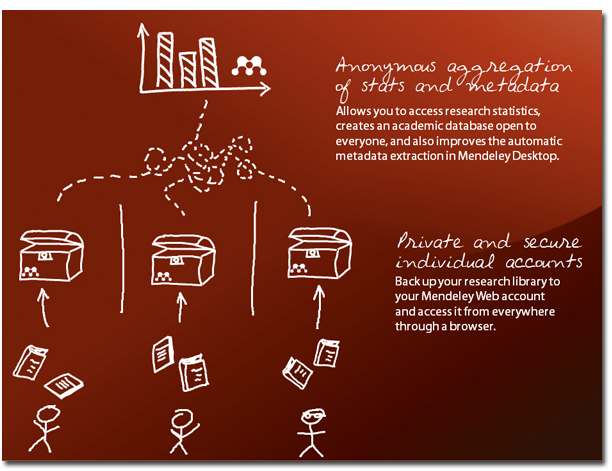
However, what makes Mendeley different is the aggregation of bibliographic data (35 million references and counting).

privacy_1264073462.jpg


I'd argue it's the fate of this aggregation that matters. In a comment on the Guardian's piece Mendeley 'most likely to change the world for the better', Jane Good wrote:
"World-changing potential"? This utopian fantasy stuff is a little much, no? After all, we're talking about a for-profit corporation using closed-source software to monitor private usage habits for monetary gain. And how exactly is this company meant to sustain its millions of dollars of annual burn on a few measly storage subscriptions? At some point the data will have to go up for sale to the highest bidder, plain and simple. The API, as it exists now, does not provide access to that data, and it probably never will, right, DrGinn[sic]?

Toning down the rhetoric, the question is Mendeley, Scopus, Talis – will you be making your data Open?:

But how can a company create an income stream from Open Scientific content? That’s the a question for me for this decade. If we can solve it we can transform the world. If however the linked Open data are all going to be through paywalls, portals, query engines then we regress into the feudal information possession of the past. I hope the companies present in this session can help solve this. It won’t be easy but it has to be done. So I now ask Mendeley, Elsevier/Scopus, Talis: Are your data Openly available for re-use?

For me the question of whether the source code for the Mendeley desktop will be made open source is a red herring, and ultimately a distraction from the real question — will the data be open?

Friday, August 27, 2010

Navigating the Encyclopedia of Life tree on the desktop and the iPhone

This week seems to be API week. The Encyclopedia of Life API Beta Test has been out since August 12th. By comparison with the Mendeley API that I've spent rather too much time trying to get to grips with, the EOL API release seems rather understated.

However, I've spent the last couple of days playing with it in order to build a simple tree navigating widget, which you can view at http://iphylo.org/~rpage/eoltree/.

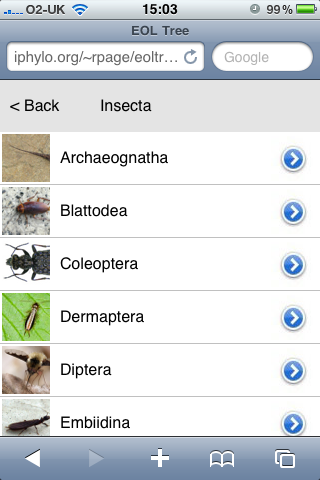
The widget resembles Aaron Thompson's Taxonomy (formerly called KPCOFGS) iPhone app in that it uses the iPhone table view to list all the taxa at a given level in a taxonomic tree. Clicking on a row in this table takes you to the descendants of the corresponding taxon, clicking "Back" takes you back up the tree. if you've reached a leave node (typically a species) the widget displays a snippet of information about that taxon. It also resembles Javier de la Torre's taxonomic browser written in Flex.

Here's a screen shot of the widget running in a desktop web browser:

insecta.png

Here's the same widget in the iPhone web browser:

web.pngUsing the API
The EOL API is pretty straightforward. I call the http://www.eol.org/api/docs/hierarchy_entries API to get the tree rooted at a given node, then populate each child of that node using http://www.eol.org/api/docs/pages. The result is a simple JSON file that I cache locally to speed up performance and avoid hitting the EOL servers for the same information. because I'm locally caching the API calls I need a couple of PHP scripts to do this, but everything else is HTML and Javascript.

iPhone and iPad
I've not really developed this for the iPhone. I've cobbled together some crude Javascript to simulate some iPhone-like effects, but if I was serious about the phone I'd look into one of the Javascript kits available for iPhone development. However, I did want something that was similar in size to the iPhone screen. The reason is I'm looking at adding taxonomic browsing to the geographic browser I described in the post Browsing a digital library using a map, so I wanted something easy to use but which didn't take up too much space. In the same way that the Pygmybrowse tree viewer I played with in 2006 was a solution to viewing a tree on a small screen, I think developing for the iPhone forces you to strip things down to the bare essentials.

I'm also keeping the iPad in mind. In portrait mode some apps display lists in a popover like this:

popover_flatten.png

This popover takes up a similar amount of screen space to the entire iPhone screen, so if I was to have a web app (or native app) that had taxonomic navigation, I'd want it to be about the size of the iPhone.

Let me know what you think. Meantime I need to think about bolting this onto the map browser, and providing a combined taxonomic and geographic perspective on a set of documents,

Thursday, August 26, 2010

Mendeley API PHP client

mendeley.pngFollowing on from my earlier post about the Mendeley API, I've bundled up my code for OAuth access to the Mendeley API for anyone who's interested in playing with the API using PHP. You can browse the code on Google Code, or grab a tarball here. You'll need a consumer key and a consumer secret from Mendeley for the demos to work, and if you're behind a HTTP proxy you'll have to tweak the code (this is explained in the ReadMe.txt file that comes with the code).

The code is pretty rough, and doesn't use all the Mendeley API calls, but I've other things to do, and it felt like a case of either bundle this up now, or it will get lost among a host of other projects. The Mendeley API still feels woefully under-developed. I'd be more interested in developing this client further if the API was powerful enough to do the kinds of things I'd like to do.

Tuesday, August 24, 2010

Browsing a digital library using a map

Every so often I revisit the idea of browsing a collection of documents (or specimens, or phylogenies) geographically. It's one thing to display a map of localities for single document (as I did most recently for Zootaxa), it's quite another to browse a large collection.

Today I finally bit the bullet and put something together, which you can see at http://biostor.org/maps/. The website comprises a Google Map showing localities extracted from papers in BioStor, and a list of the papers that have one or more points visible on the map.

mapbrowser.png


In building this I hit a few obstacles. The first is the number of localities involved. I've extracted several thousand point localities from articles in BioStor. Displaying all these on a Google Map is going to be tedious. Fortunately, there's a wonderful library called MarkerCluster, part of the google-maps-utility-library-v3 that handles this problem. MarkerCluster cluster together markers based on zoom level. If you zoom out the markers cluster together, as you zoom in these clusters will start to resolve into their component points. Very, very cool.

The second challenge was to have the list of references update automatically as we move around or zoom in and out on the map. To do this I need to know the bounding box currently being displayed in the map, I can then query the MySQL database underlying BioStor for the localities within the bounding box, using MySQL's spatial extensions. The query is easy enough to implement using ajax, but the trick was knowing when to call it. Initially, listening for the bounds_changed event seemed a good idea. However, this event is fired as the map is being moved (i.e., if the user is panning or dragging the map a whole series of bounds_changed events are fired), whereas what I want is something that signals that the user has stopped moving the map, at which point I can query the database for articles that correspond to the region that map is currently displaying. Turns out that the event I need to listen for is idle (see Issue 1371: map.bounds_changed event fires repeatedly when the map is moving), so I have a function that captures that event and loads the corresponding set of articles.

Another "gotcha" occurs when the region being viewed crosses longitude 180° (or -180°) (see diagram below from http://georss.org/Encodings).

179-rule.jpg


In this case the polygon used to query MySQL would be incorrectly interpreted, so I create two polygons, each with 180° or -180° as one of the boundaries, and merge the articles with points in either of those two polygons.

I've made a short video showing the map in action. Although I've implemented this for BioStor, the code is actually pretty generic, and could easily be adapted to other cases where we want to navigate through a set of objects geographically.


Viewing scientific articles on the iPad: the PLoS Reader

Continuing on from my previous post Viewing scientific articles on the iPad: towards a universal article reader, here are some brief notes on the PLoS iPad app that I've previously been critical of.

There are two key things to note about this app. The first is that it uses the page turning metaphor. The article is displayed as a PDF, a page at a time, and the user swipes the page to turn it over. Hence, the app is simulating paper on the iPad screen.

turn.jpg


But perhaps more interesting is that, unlike the Nature app discussed earlier, the PLoS app doesn't use a custom API to retrieve articles. Instead the app uses RSS feeds from the PLoS site. PLoS provides journal-specific RSS feeds, as well as subject-specific feeds within journals (see, for example, the PLoS ONE home page). The PLoS Reader app takes these feeds and uses them to create a list of articles the reader can choose from.

A nice feature of the PLoS ATOM feeds is the provision of links to alternative formats for the article (unlike many journal RSS feeds, which provide just a DOI or a URL). For example, the feed item for the article "Transmission of Single HIV-1 Genomes and Dynamics of Early Immune Escape Revealed by Ultra-Deep Sequencing" doi:10.1371/journal.pone.0012303 contains links to the PDF and XML versions of the article:


<link rel="related"
type="application/pdf"
href="http://www.plosone.org/article/fetchObjectAttachment.action?uri=info:doi/10.1371/journal.pone.0012303&representation=PDF"
title="(PDF) Transmission of Single HIV-1 Genomes and Dynamics of Early Immune Escape Revealed by Ultra-Deep Sequencing" />
<link rel="related"
type="text/xml"
href="http://www.plosone.org/article/fetchObjectAttachment.action?uri=info:doi/10.1371/journal.pone.0012303&representation=XML"
title="(XML) Transmission of Single HIV-1 Genomes and Dynamics of Early Immune Escape Revealed by Ultra-Deep Sequencing" />


This makes the task of an article reader much easier. Rather than attempt to screen scrape the article web page, or rely on a rule for constructing the link to the desired file, the feed provides an explicit URL to the different available formats.

I've not seen this feature in other journal RSS feeds, although article web pages sometimes provide this information. BMC journals, for example, provide <link rel="alternate"> tags in the web page for each article, from which we can extract links to the XML and PDF versions, and some journals (BMC included) provide the Google Scholar metadata data tag <meta name="citation_pdf_url"> to link to the PDF. Hence, a generic article reader will need to be able to extract metadata tags from article web pages as it seeks formats suitable to display.

Monday, August 23, 2010

TreeView X now on Google Code

tv.pngTreeView X, the open source version of TreeView, has been slowly suffering bit rot as C++ compilers and operating systems change. Every so often I'd tweak the code to build on some Linux version or other, but this isn't something I've a lot of time for. Moreover, because of the hassle of rebuilding binaries and source tar balls the updated versions weren't uploaded to the TreeView X web site. Charles Plessy has been doing a nice job of keeping a Debian package working, but my own code wouldn't build on newer versions of Linux.

Today I managed to get my code to build on Fedora Core 13 using gcc 4.4.4 and the latest stable version of wxWidgets (2.8.11). The program runs OK, although there are some display glitches, and printing seems broken. However, my days of standalone application development are over, so I thought I should make the code accessible to anyone else who may find it of use. The code is now hosted on Google Code.

Viewing scientific articles on the iPad: towards a universal article reader

There are a growing number of applications for viewing scientific articles coming out for the iPhone and iPad. I'm toying with extending the experiments described in an earlier post when I took the PLoS iPad app to task for being essentially a PDF page-turner, so I thought I should take a more detailed look at the currently available apps. In particular, I'm interested in how the apps solve some basic tasks, and whether there is a consistent "vocabulary" for interacting with an article. Put less pretentiously, do the apps display things such as lists of articles, citations, references, figures, and bibliographic data in similar ways, or does the user have to learn new rules for each app? I'm also interested in how the apps treat the article (e.g., as a monolithic PDF, as a document with pages, or as a web document where pagination has no meaning), and how they get their content (from a publisher, from the user's social network, from the user's personal library).

Nature
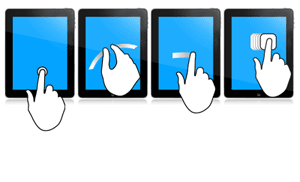
In this post I'm going to look at Nature.com's app. Future posts will explore other apps. I'm interested in what people have done so far, and how we could improve the reading experience. Long term I'm interested in whether there's scope for a "universal article reader" that can take diverse formats (including XML, PDF, and page images) and display them in a consistent and useful way. In the diagrams below I'm using touch gesture symbols from Graffletopia (see Touch Gesture Reference Guide).


Contents
Nature's app is limited to articles published by Nature, and displays the available articles as a list with thumbnails of a figure from the article. The app fetches this list using Nature's mobile API. Up until April 30th the fulltext of an article was free, at at present you are limited to getting abstracts. It's interesting that the list of articles isn't retrieved using a RSS feed, I presume because Nature wanted to use some simple authentication to avoid users downloading all their closed-access content for free.

touch1.jpg

Article display
Nature's app, unlike all the others I've seen so far, doesn't use PDFs. Instead it uses ePub. Unlike many ePub book readers (including Apple's own iBooks), the Nature app doesn't render the article as a series of pages, but as one continuous document that you scroll down by dragging (it's essentially a web page). You can't zoom the text, but the text size is fine for reading.

touch2.jpg

Citations
Citations in the body of the article are links. If you tap them the full citation slides in from the right, with a link to the publisher's website. If you tap the link the app opens the website within the app. This can be a little jarring as you move from a customised view of an article to a web page designed for a desktop. In the case of a Nature article, it would be more elegant if the app recognised that the cited reference was a Nature article and rendered it natively in the app. More generally the transition between app and website might be less jarring if journal publishers developed mobile versions of their websites.

touch3.jpg


Figures
The figures aren't displayed directly in the body of the article, but each mention of a figure in the body of the text is a link. Tapping the link causes the figure to slide up from the bottom of the screen. A button in the top right hand corner enables you to toggle between displaying the figure and it's caption (shown as white text on a black background). You can use pinch and spread to zoom in and out of the figure, as well as save it to the photo library on your device.

touch4.jpg


Summary
I've started with the Nature app as I think it's the only one so far to seriously tackle the challenge of displaying an article on a mobile device. Instead of displaying PDFs it repackages the articles in ePub format and the result is much more interactive than a PDF.

I hope to explore other article viewing apps in later posts, but it's worth noting that we should also be looking at other apps for ideas. Personally I really like the Guardian's iPhone app, which I use as my main news reader. It has a nice gallery feature to display thumbnails of images (imagine a gallery of an article's figures), and uses tags effectively.


Monday, August 16, 2010

More on the Mendeley API

After playing with the public API for Mendeley over the weekend (see Social citations: using Mendeley API to measure citation readership) I've had a quick play with the user specific part of the API. This API enables apps to connect with a user's account, so you could imagine using it to personalise citations lists (as I mentioned in the previous post), or building apps to handle a user's reading list (to complement Mendeley's existing desktop and iPhone clients).

Once again, it's frustrating just how rough the API is. The documentation is incomplete and contains errors, and some of the API calls simply don't work (see this post). I know I'm sounding like a broken record, but this API really needs a test suite. The quickest way to annoy potential users of the API is to get them to find really obvious bugs for you.

With a test suite in mind, I've created a simple app that enables you to connect to your Mendeley account and perform a bunch of simple tasks. The hardest part of getting this working was getting my head around OAuth. Luckily, @abraham has written a PHP library to support OAuth access to Twitter's API, so I grabbed that and replaced Twitter-specific code with the equivalent code for Mendeley.

Demo
You can try the app here: http://iphylo.org/~rpage/mendeley/moauth/.

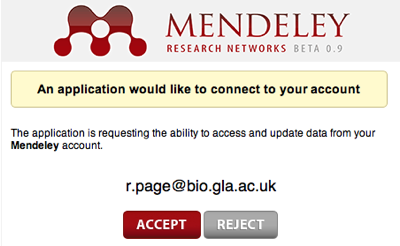
The first time you go to the app is shows a button to connect to Mendeley. If you click on it you'll see something like this:
connect.png
(if you're not already logged in to Mendeley it may ask you to log in — note that all of this happens on Mendeley's site, my app never knows your username or password details). If you're willing to try the app, allow it to connect to your account. You'll then see a bunch of API requests and results. All but one of the requests is simply displaying information. One request does try to add a test document (the one listed on the Mendeley developer's site), but at the moment this part of the API doesn't seem to work (nor does the call to get the list of papers that you've authored).

If and when Mendeley get the API working fully (and documented) there's a lot of scope here. But what I'd really like to see is Mendeley develop a test suite that runs through every API call and checks that the methods work as advertised.

Saturday, August 14, 2010

Social citations: using Mendeley API to measure citation readership

Quick note on an app I threw together using the Mendeley API that I discussed in the previous post. This app is crude, and given that the Mendeley API is rate-limited and in flux it might not work for you.

The basic idea is to embellish make the list of literature cited in an article with information that might help a reader decide whether a given citation is worth reading. One clue might be how many people on Mendeley are reading that article. So, my app takes an article, extracts the list of cited literature, and for each article with a PubMed identifier it asks Mendeley "how many readers does this article have?" For now the app is restricted to using articles from the BiomedCentral series as these have Open Access XML with literature cited lists that contain PubMed numbers (PLoS articles, for instance, don't have these, for now I'm avoiding the overhead of finding identifiers for the articles). I'm using PubMed identifiers as the Document Details method in the Mendeley API doesn't handle DOIs at present.

The app is at http://iphylo.org/~rpage/mendeley/, and the default article I've chosen to demonstrate the app is Robust physical methods that enrich genomic regions identical by descent for linkage studies: confirmation of a locus for osteogenesis imperfecta doi:10.1186/1471-2156-10-16, but you can enter the DOI of any BMC article to give it a try. Below is a screenshot of part of the list of literature cited by this paper, together with readership numbers:

readership.png

The default article has 4 readers in Mendeley. The readership of the articles it cites varies, but one article stands out with 208 readers.

There are huge limitations with this app (it doesn't cache the Mendeley results, so repeated use will exceed the rate limits), it is limited to citations in PubMed (could add support for DOIs and title searches), and only BMC articles can be processed.

What would be interesting is to extend this in other directions. For example, if the user had a Mendeley account, it would be nice to flag which articles the reader already had in their library (and perhaps have the ability to add those that weren't to the library). To personalise the citation readership display I'd need to add support for OAuth, which Mendeley uses to authorise access to user accounts.

If Mendeley were to provide more social features in their API then we could add flags indicating whether any of user's contacts have any of these articles in their libraries (your decision to read a paper might be influenced by whether a contact of yours has read it -- think of it as a resembling the Facebook "Like" button). Or we could display the readers themselves, so you could discover people with potentially similar interests to your own.

My twitter stream has been full of complaints about the Mendeley API — life on the bleeding edge is not always fun. But the API does have the potential to support some cool applications, once it gets the kinks ironed out.